Ask AI · for live sales calls, demos & training
Only you
can see it.
Highlight anything on screen and press ⌘⇧X. The answer appears in your private overlay — from your own notes, while your window never loses focus.
*Except full-desktop shares on some apps. We warn you before that bites — details in the FAQ.
Their Zoom — the shared window, and nothing else.
Your screen — highlight, ⌘⇧X, answered. The overlay never joins the share.
Simulated — same screen, two views.
A question arrives in the meeting chat: “how does your pricing scale past fifty seats?”. In the presenter view, you highlight it and press Command Shift X; Presenter Companion shows a short answer drawn from your notes file pricing-battlecard.md, and your window keeps focus. The audience view shows only the shared slide.
They see a great presenter. You see the answer.
Run of show
Like presenter notes —
for your whole screen.
Cue 01
Load your notes
Paste in your battlecard, pricing, and FAQ. Answers come from what you approved — nothing gets pulled from the open internet.
Cue 02
Share one window
Share the app you’re presenting, the normal way. The companion stays off the shared screen and out of the recording.
Cue 03
Highlight. ⌘⇧X. Answered.
A question in the chat, a term in their doc, a number on a dashboard — highlight it and press ⌘⇧X. The answer lands in your overlay while your window keeps focus. Never “let me get back to you.”
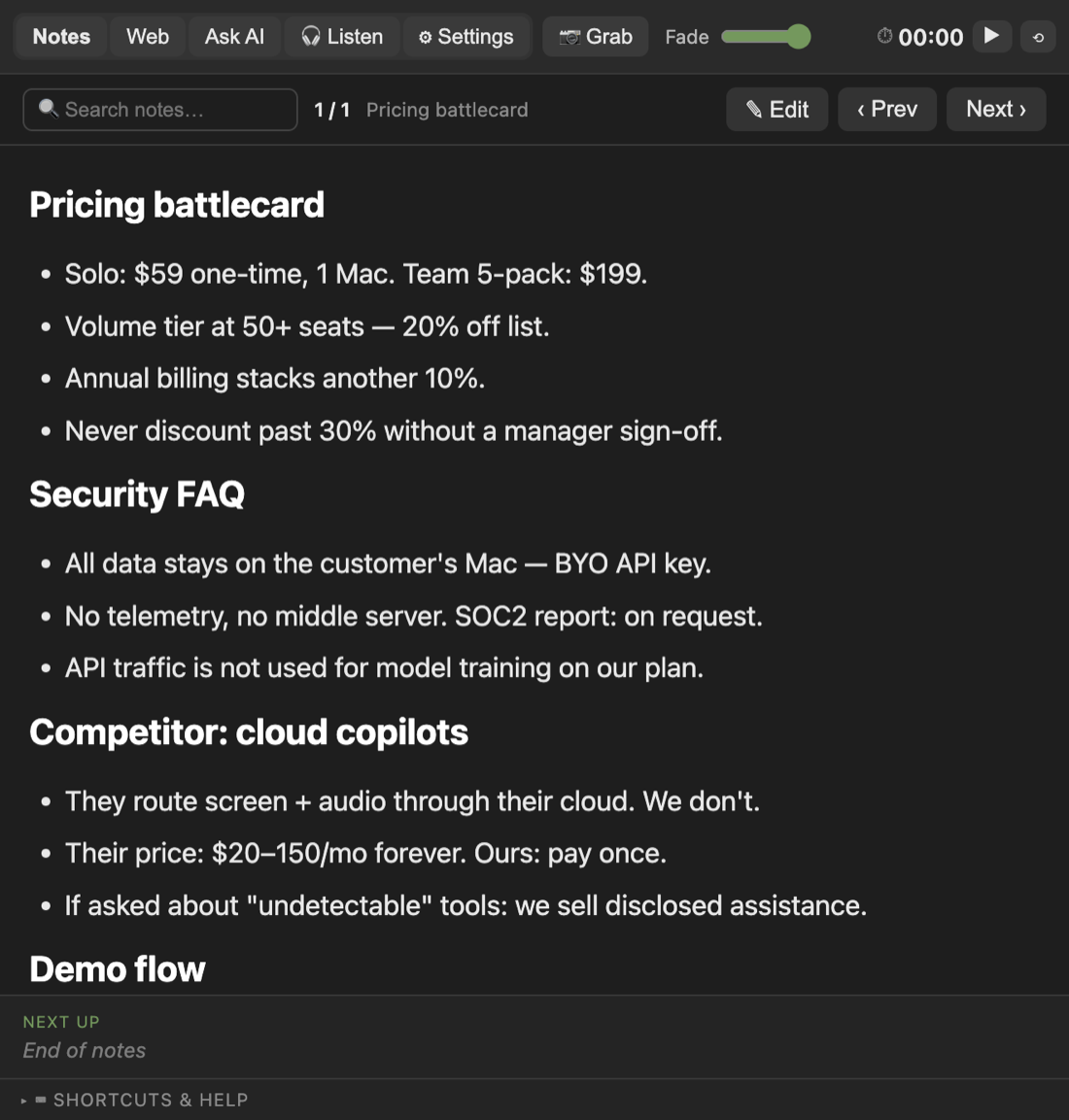
Source: your notes
Grounded, not generated.
01 · Asked
The text you highlighted (⌘⇧X) — or typed (⌘⇧A), spoke (⌘⇧V), or grabbed as a screen region (⌘⇧G).
02 · The answer
Your own AI reads it — highlighted text, or the image from a screen grab — and writes back an answer: short enough to glance at mid-sentence, detailed enough to say out loud.
03 · The source
When the answer comes from your notes, it names the file. If your notes don’t cover it, it tells you — instead of quietly guessing.
Recap & export
One click when the call ends: a clean summary as PDF, HTML, or Markdown.
Your own key
Your content goes straight to your own OpenAI account, never through our servers. One key powers everything.
Zoom, Meet, Teams, Slack
Works with a normal single-window share in any of them — and most other call apps. No plugins, no bots joining your call.
Bonus — hears the room (beta)
It can also listen live and answer the other side’s questions on its own. A bonus on top of Ask — still improving.
Bonus feature · in beta
Listening starts with
a disclosure.
Auto-listen is a bonus we’re still polishing — and even so, it never starts without a consent gate that ships in the product, not the fine print.
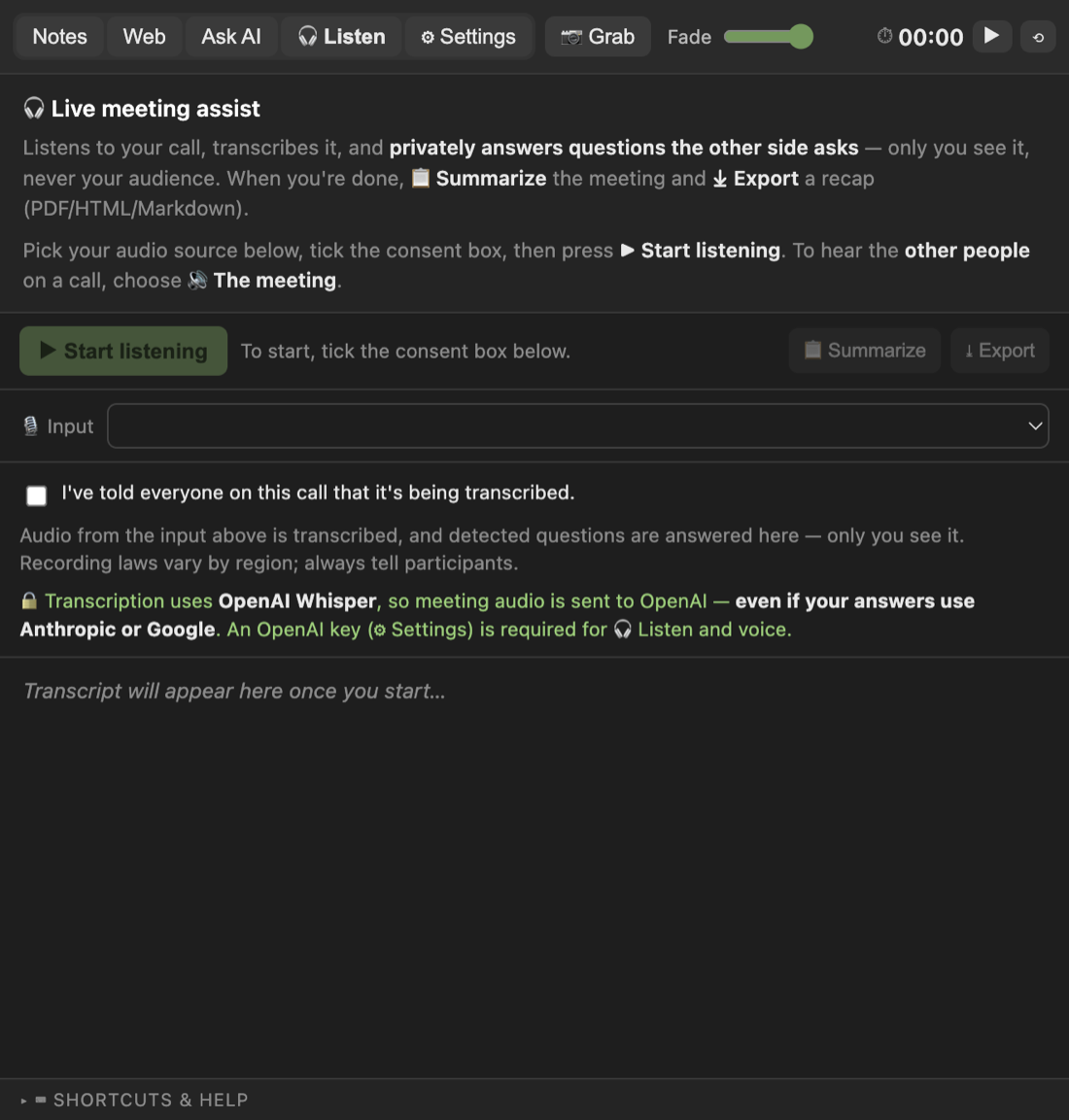
Exhibit A · for your security review
Built to be approved.
Some copilots sell the promise that nobody will know. We sell the version you can show your legal team.
The whole data flow, one sentence: your notes stay on the Mac; questions go to your AI provider on your key; nothing reaches us.
| Presenter Companion | Typical cloud copilot | |
|---|---|---|
| Disclosure | Consent gate before Listen starts | “Nobody will know” sold as the feature |
| Data path | Your Mac → your own AI key. No middle server, no telemetry | Screen and audio routed through their cloud |
| Answers | Your approved notes, source cited | Model improvisation |
| Cost | $59, once | $20–150 a month, forever |
Not for
Don’t use it where you’re meant to rely on your own knowledge — job interviews, proctored exams, certification tests — or on any call you haven’t told people about. We can’t see how you use the app, so we can’t police this. But we’re asking you not to: it isn’t fair, and it isn’t what we built it for. Our Terms ask the same.
Memo · from the maker
I built this after freezing on a pricing question I actually knew the answer to. It was right there in my notes — but a few windows deep, so I had to scroll for it while a customer watched. Presenter Companion is made by NK Hardware LLC: a small shop, not a big company chasing growth. It doesn’t track you and there are no sneaky tricks — it’s just an app I use on my own calls, priced at what I’d happily pay myself.
— NK Hardware LLC
The invoice · there is only one
Pay once. Own it.
No subscription — the app runs on your Mac with your key, so there’s nothing to rent. AI usage is pay-as-you-go with your provider; a typical call costs pennies.
Solo
$59 one-time
- Every feature, one Mac
- Your own AI key
- Updates free for a year
- 3-day trial first
Stripe checkout · one-time · license by email
Team 5
$199 one-time
- Five activations, move them anytime
- One shared battlecard — everyone on message
- Updates free for a year
- 3-day trial first
Stripe checkout · one-time · license by email
The trial is the pitch. Run it on three real calls, free, no card. If it doesn’t earn the $59, don’t pay it. Your license key arrives by email the minute you do — paste it into Settings ▸ License.
Q & A
Fair questions.
Can other people really not see it?
When you share a single app window — the normal way to present — the companion stays off the shared screen and out of the recording. One honest exception: a full-desktop share on some apps, including Zoom, will show it. So share one window; the app reminds you before every session.
How does the highlight shortcut work?
Highlight text in any app and press ⌘⇧X. The app reads the highlight, restores your clipboard, and streams the answer into the overlay — your window keeps focus the whole time, so you never switch tabs mid-sentence. It asks for macOS Accessibility permission once, and walks you through granting it. Prefer to type or talk? ⌘⇧A opens the Ask box; ⌘⇧V takes the question by voice; ⌘⇧G explains a screenshot region.
What languages does it understand?
Listen auto-detects the spoken language — nothing to set, and it handles calls that switch between languages mid-call. English is strongest; the rest work well and vary a little. The full set of supported languages:
Afrikaans, Arabic, Armenian, Azerbaijani, Belarusian, Bosnian, Bulgarian, Catalan, Chinese, Croatian, Czech, Danish, Dutch, English, Estonian, Finnish, French, Galician, German, Greek, Hebrew, Hindi, Hungarian, Icelandic, Indonesian, Italian, Japanese, Kannada, Kazakh, Korean, Latvian, Lithuanian, Macedonian, Malay, Marathi, Maori, Nepali, Norwegian, Persian, Polish, Portuguese, Romanian, Russian, Serbian, Slovak, Slovenian, Spanish, Swahili, Swedish, Tagalog, Tamil, Thai, Turkish, Ukrainian, Urdu, Vietnamese, and Welsh.
Is listening to a call legal?
Recording-consent laws vary; some regions require every participant’s consent. Before Listen starts, the app has you confirm you’ve told the room. Always disclose — it’s in our Terms, and it’s the whole point.
Where does my data go?
Your notes stay on your Mac. During a call, audio and questions go to your AI provider — your own OpenAI account, on your key. Nothing touches our servers. There is no telemetry to turn off, because there is none.
What does it cost to run?
Nothing recurring from us. Your API key is pay-as-you-go — typically pennies per call. One OpenAI key powers everything — Listen, voice, and answers. That’s the only key you need.
Why pay once instead of a subscription?
Because we don’t do ongoing work for you. The app runs on your machine with your key — there’s no server bill to pass along. $59, and updates are free for a year.
How many Macs per license?
Solo activates one; Team activates five. Deactivate a machine anytime to free the seat and move it.
What is it not for?
Anywhere you’re meant to rely on your own knowledge — job interviews, proctored exams, certification tests — or any call you haven’t told people about. The app doesn’t track you, so we can’t know how you use it — we just ask you plainly not to. It isn’t fair, and it isn’t what this app is for.
Places, please
Ready when you are.
Download for macOS Free for 3 days · delete one file to uninstall
macOS 13+, Apple Silicon & Intel · no account, no card, no email. The trial starts when you do.
Already sold? Buy Solo — $59 · Buy Team — $199